
Ein Ersatz-POS-Netzteil wählen: Spannung, Stromstärke, Stecker und Polarität (gleich beim ersten Mal richtig)
Ein Kaufratgeber zum Ersetzen eines POS- oder Peripherie-Netzteils — warum die Spannung exakt passen muss, warum die Stromstärke ein Minimum (kein Maximum) ist, wie man Steckergröße und Polarität trifft, und wie man ein unsicheres gefälschtes Netzteil vermeidet.
Die vier entscheidenden Specs
Replacing a POS power supply isn’t about wattage guesswork — it’s four specs read off a label. Match the voltage exactly, supply at least the rated amperage, and match the connector and polarity perfectly. Get those four right and the replacement just works; get one wrong and the device won’t power up — or gets damaged.
| Spec | Rule | Get it wrong and… | |
|---|---|---|---|
| Voltage (V) | Match exactly | Won't start (low) or damage (high) | — |
| Amperage (A) | At least the rated value | Underrated supply overheats / shuts down | — |
| Connector | Match size, length & type | Won't seat or makes poor contact | — |
| Polarity | Match the +/- diagram | Reversed polarity can damage instantly | — |
Das Typenschild lesen
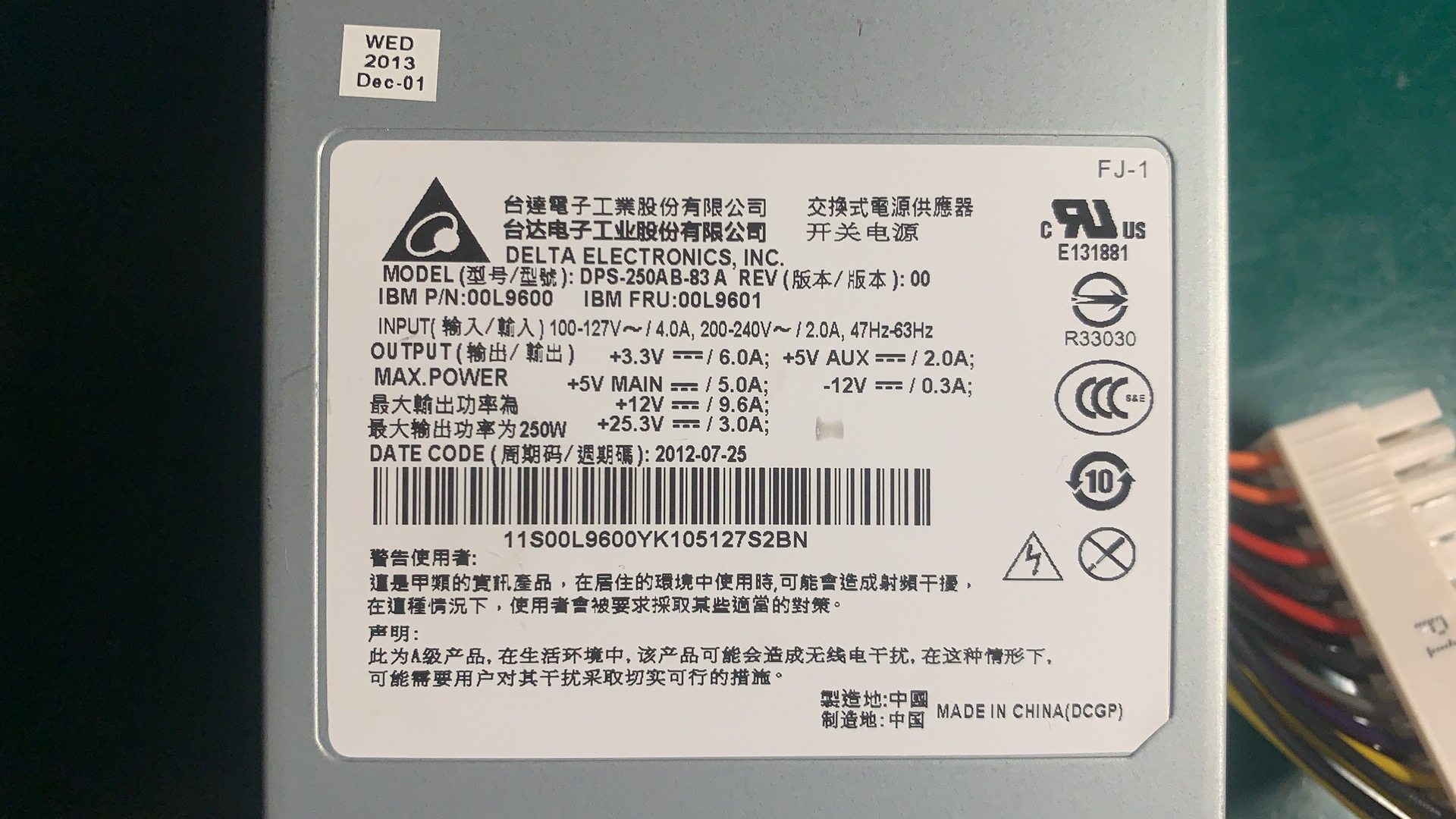
Everything you need is on the rating label of the device or the old adapter. A typical POS adapter label reads like this:
If the label is worn, the device manual lists the same voltage and current. Note the output figures (the DC the device needs), not the input (mains) figures.
Spannung: exakt treffen
Voltage is the one spec with zero tolerance for “close enough.” It must match the device’s rated input because internal regulators expect that level:
| If voltage is… | Result | |
|---|---|---|
| Too low | Device won't power up, or browns out and behaves erratically | — |
| Exactly matched | Correct — what the device is designed for | — |
| Too high | Risk of immediate or gradual damage to the device | — |
Stromstärke: ein Minimum, kein Maximum
Amperage works the opposite way to voltage: it’s a floor, not a fixed target. The device pulls only the current it needs, so equal-or-higher is safe.
| Original | Replacement | OK? | |
|---|---|---|---|
| 24V 2.5A | 24V 2.5A | Yes — exact match | — |
| 24V 2.5A | 24V 5A | Yes — higher amps is fine, often runs cooler | — |
| 24V 2.5A | 24V 2A | No — underrated, will overheat / shut down | — |
| 24V 2.5A | 19V 5A | No — wrong voltage, ignore the amps | — |
Steckergröße und Polarität
A perfectly-specced supply is useless if the plug doesn’t fit the jack — or fits loosely. Match the physical connector too:
| Connector check | What to match | |
|---|---|---|
| Outer diameter (OD) | The barrel's outside size in mm — must match the jack | — |
| Inner diameter (ID) | The centre-pin hole size in mm | — |
| Length / shape | Long enough to seat fully; some are keyed or locking | — |
| Connector type | Barrel, keyed DIN, or a standard like Powered USB on some printers | — |
Sicherheit, Zertifizierung und Fälschungen
A POS power supply runs all day and often powers payment hardware, so safety isn’t optional. Run this final check before buying:
- 1
Confirm V, A, connector, polarity
Voltage exact, amperage at least the rating, connector size/type matched, polarity diagram matched. All four before anything else. - 2
Check for certification marks
Look for proper safety certification on the unit. Missing or unclear markings suggest a brick that may not meet safety standards.Caution: Suspiciously low prices versus genuine units are a common counterfeit signal. - 3
Buy OEM or a reputable replacement
Choose the genuine OEM supply or a vetted equivalent with the right specs and certification — not the cheapest anonymous adapter. - 4
Test before deploying
Power the device and confirm normal operation before putting the lane back into service. Watch for a unit that runs hot or buzzes.
Browse power adapters and internal PSUs in our power supplies category, related parts in terminal repair parts, and DC/power leads in cables & connectors. If your device shows no power at all, first work through our power-supply failure diagnosis guide to confirm the supply is the fault; for printers on the Powered USB standard, see the Powered USB guide. Send us the label figures (V, A, connector) and we’ll match the right supply.
Häufig gestellte Fragen
Wie finde ich heraus, welches Netzteil mein POS-Gerät braucht?
Muss die Ersatzspannung exakt gleich sein?
Kann ich ein Netzteil mit höherer Stromstärke nutzen?
Wie treffe ich den DC-Stecker (Hohlstecker)?
Was ist Polarität und warum ist sie wichtig?
Sind billige No-Name-Ersatznetzteile sicher?
Quellen & weiterführende Literatur
- Selecting a Replacement External Power Supply — What You Need to Know — Power Electronic Tips
- How to Select a Replacement Power Adaptor or DC Power Supply — Antsig
- How Can You Know What Power Supply Will Work With Your Device? — The Solid Signal Blog
- How to Find the Right Power Adapter: Safety & Buying Tips — KYT Chargers
Verwandte Anleitungen
All-in-One vs modulare POS-Terminals: Was kaufen (und wie jedes Reparaturen beeinflusst)
All-in-One ist aufgeräumt und schnell einsatzbereit; modular ist flexibel und günstiger aufzurüsten und zu reparieren. Die richtige Antwort hängt von Größe, Wachstumsplänen — und wie Sie Ausfälle handhaben wollen.
Anleitung lesen →Barcode-Scanner-Kaufratgeber: 1D-Laser vs 2D-Imager, kabelgebunden vs kabellos, handgeführt vs freihändig
Zwei Fragen entscheiden das meiste: Müssen Sie Handy-Displays scannen (dann 2D), und ist Ihre Kasse voll genug für freihändig? So passen Scannertechnik, Bauform und Anschluss zur realen Nutzung.
Anleitung lesen →Beleg-Auto-Cutter: Guillotine vs Rotation, Teilschnitt vs Vollschnitt, und Klingen-Lebensdauer
Guillotine oder Rotation? Teil- oder Vollschnitt? Der Cutter ist das meistgenutzte bewegliche Teil im Belegdrucker — der richtige Typ und Schnittmodus hält die Kasse schnell und die Belege ordentlich.
Anleitung lesen →Verwandte Kategorien
Empfohlene Ersatzteile

%20Sparta%20Riser%20Card/120c399634d85265f7a7595a979407ee_c48b4b186f0a2eea2b86d0d5a86c219e_s-l1600.jpg)

Benötigen Sie die in dieser Anleitung erwähnten Teile?
Originale OEM- und werksgeprüfte Aftermarket-Teile für IBM, Toshiba, NCR, Diebold, Wincor und Hyosung Systeme — mit weltweitem Versand.


