
شرح PoweredUSB: كابلات POS بجهد 5V و12V و24V، الموصّلات، وكيفية اختيار الصحيح
دليل شراء لـ PoweredUSB (Retail USB / USB PlusPower) لأنظمة POS — ما هو، وترميز الجهد واللون 5V/12V/24V، وتمييز 1x8 مقابل 2x4، وكيفية مطابقة كابل لطابعتك أو جهازك الطرفي، ولماذا يهم الجهد.
ملخّص في 60 ثانية
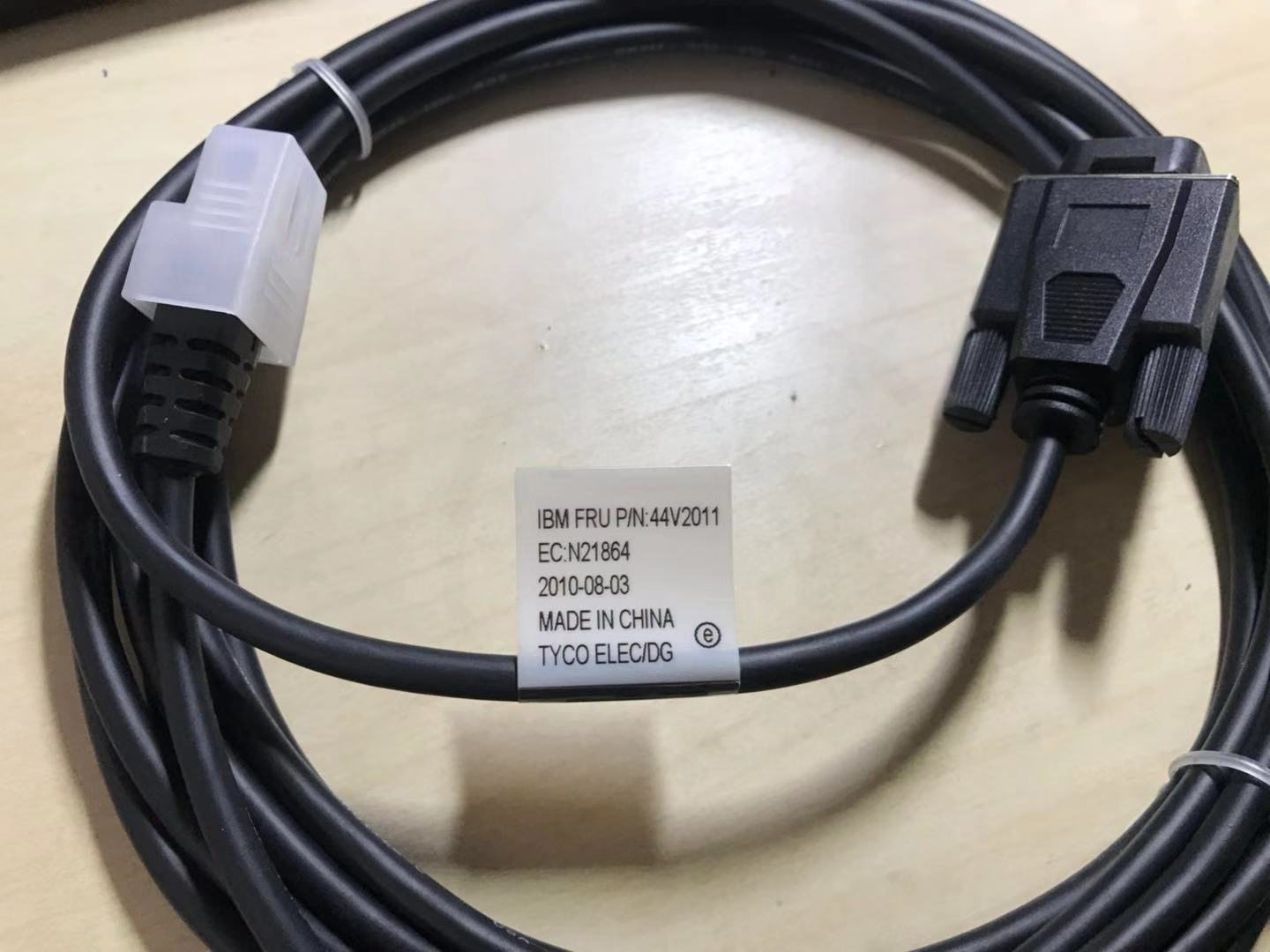
PoweredUSB (also called Retail USB, USB PlusPower or USB +Power) is a USB connector that carries data and DC power in one cable, so a receipt printer or touchscreen can run without its own power brick. The only two things you must get right when buying one are the voltage and the connector shape — and the standard makes both easy to check:
| Voltage | Colour | Max power | Typical device | |
|---|---|---|---|---|
| 5 V | Grey | ~30 W | Low-power peripherals | — |
| 12 V | Teal / blue-green | ~72 W | Scanners, some printers | — |
| 24 V | Red | ~144 W | Receipt printers (Epson/IBM) | — |
| 19 V (variant) | Violet | — | Specific devices | — |
ما هو PoweredUSB ولماذا تستخدمه أنظمة POS
A standard USB port gives you data and a little 5 V power — fine for a mouse, not enough for a thermal receipt printer. PoweredUSB solves that by stacking a power connector onto a standard USB plug: the bottom half is ordinary USB (data), the top half delivers higher-current DC. One cable, both jobs, far less clutter behind the counter.
You’ll find PoweredUSB on receipt printers, touchscreens and scanners from the major POS brands. Because it removes a power supply per peripheral, it cuts both cable count and the number of mains outlets a lane needs.
الجهود وترميز الألوان والقدرة
The standard offers three main voltages plus a variant, each colour-coded so you can identify a cable or port instantly:
أنواع الموصّلات والتمييز
Voltage isn’t the only variable — the physical pin arrangement at the device end differs too. The two you’ll meet most are described by their pin layout:
| Connector | Layout | Notes | |
|---|---|---|---|
| 1x8-pin | Eight contacts in one row | Common on many Epson / IBM printers | — |
| 2x4-pin | Two rows of four | Used by other printers/terminals | — |
| Keying by voltage | Plugs physically polarised | 12 V and 24 V won't interchange — by design | — |
Crucially, the different voltage versions are mechanically keyed so they can’t be mis-plugged — a 12 V plug won’t fully seat into a 24 V socket. That keying is a safety feature, not an obstacle: if a connector resists, you have the wrong cable, not a stubborn port.
مطابقة كابل لجهازك
Choosing the right PoweredUSB cable is a short, ordered checklist. Work it from the device outward:
- 1
Read the device's rated voltage
Check the printer or peripheral’s label or spec sheet for its input voltage (commonly 24 V for receipt printers, 12 V for many scanners). This decides the cable colour/version. - 2
Identify the connector layout
Note the device-end plug shape — 1x8-pin or 2x4-pin. The cable must match this exactly, so a 24 V printer may need, e.g., a “24 V 1x8-pin” cable. - 3
Confirm the host-end connector
Check what the terminal or PoweredUSB hub/expansion card provides at the other end, and pick a cable with the matching host plug. - 4
Check current and length
Make sure the cable is rated for the device’s current draw (contacts handle ~3 A) and choose a length that reaches without strain — use a PoweredUSB extension or hub if you need more reach.Caution: Never adapt across voltages to make a plug fit — match the device's rated voltage exactly.
عندما لا يُغذّى جهاز طرفي
If a PoweredUSB peripheral won’t power up, run these checks before suspecting the device:
| Check | What to confirm | |
|---|---|---|
| Voltage match | Cable colour/version matches the device's rated input | — |
| Fully seated | Connector clicked home at both ends, correct keying | — |
| Cable/port current rating | Rated for the device's draw; not a thin data-only cable | — |
| Port supplies power | Some ports are data-only — confirm it's a powered port | — |
| Swap test | Known-good port + cable powers it = original cable/port faulty | — |
Browse PoweredUSB cables, extensions and adapters in our cables & connectors category, PoweredUSB hubs and expansion cards in interface cards, and replacement bricks in power supplies. If a printer on a PoweredUSB line is dead rather than miscabled, see our power supply failure diagnosis guide. Tell us your printer or peripheral model and we’ll match the exact voltage and connector before you order.
الأسئلة الشائعة
ما هو PoweredUSB؟
ما الجهود التي يوفّرها PoweredUSB؟
ماذا تعني ألوان الموصّلات؟
ما الفرق بين موصّلات PoweredUSB من نوع 1x8 و2x4؟
هل يمكنني استخدام كابل PoweredUSB بجهد 24V على جهاز 12V؟
جهازي الطرفي بـ PoweredUSB لا يعمل — ماذا أفحص؟
المصادر والمراجع الإضافية
- PoweredUSB — Wikipedia
- What Is PoweredUSB? 12V vs 24V Explained — PCM Cable
- PoweredUSB Specification (overview) — poweredusb.org
- Powered USB Equipment for POS (PlusPower) — Beagle Hardware
- PoweredUSB Cables for POS Equipment (5V/12V/24V) — Goochain
أدلة ذات صلة
أجهزة POS المدمجة مقابل المعيارية: أيّها تشتري (وكيف يؤثّر كلٌّ في الإصلاحات)
المدمج أنيق وسريع النشر؛ والمعياري مرن وأرخص في الترقية والإصلاح. الجواب الصحيح يعتمد على حجمك وخطط نموّك — وكيف تريد التعامل مع الأعطال.
اقرأ الدليل →دليل شراء ماسح الباركود: ليزر 1D مقابل مصوّر 2D، سلكي مقابل لاسلكي، يدوي مقابل بلا يدين
سؤالان يحسمان الأغلب: هل تمسح شاشات هواتف (إذًا 2D)، وهل منضدتك مزدحمة بما يكفي لتريد بلا يدين؟ إليك كيف تتطابق التقنية والشكل والاتصال مع الاستخدام الفعلي.
اقرأ الدليل →قاطعات طابعة الإيصالات الأوتوماتيكية: مقصلة مقابل دوّارة، قطع جزئي مقابل كامل، وعمر الشفرة
مقصلة أم دوّارة؟ قطع جزئي أم كامل؟ القاطعة هي القطعة المتحرّكة الأكثر استخدامًا في طابعة الإيصالات — النوع والوضع الصحيحان يبقيان الممر سريعًا والإيصالات مرتّبة.
اقرأ الدليل →فئات ذات صلة
قطع غيار مميزة

%20Sparta%20Riser%20Card/120c399634d85265f7a7595a979407ee_c48b4b186f0a2eea2b86d0d5a86c219e_s-l1600.jpg)

هل تحتاج إلى القطع المذكورة في هذا الدليل؟
قطع OEM أصلية وبدائل مختبرة في المصنع لأنظمة IBM و Toshiba و NCR و Diebold و Wincor و Hyosung — مع شحن عالمي.


