
Choisir une alimentation POS de remplacement : tension, ampérage, connecteur et polarité (réussir du premier coup)
Un guide d'achat pour remplacer une alimentation POS ou périphérique — pourquoi la tension doit correspondre exactement, pourquoi l'ampérage est un minimum (pas un maximum), comment faire correspondre la taille du connecteur et la polarité, et comment éviter un adaptateur contrefait dangereux.
Les quatre specs qui comptent
Replacing a POS power supply isn’t about wattage guesswork — it’s four specs read off a label. Match the voltage exactly, supply at least the rated amperage, and match the connector and polarity perfectly. Get those four right and the replacement just works; get one wrong and the device won’t power up — or gets damaged.
| Spec | Rule | Get it wrong and… | |
|---|---|---|---|
| Voltage (V) | Match exactly | Won't start (low) or damage (high) | — |
| Amperage (A) | At least the rated value | Underrated supply overheats / shuts down | — |
| Connector | Match size, length & type | Won't seat or makes poor contact | — |
| Polarity | Match the +/- diagram | Reversed polarity can damage instantly | — |
Lire l'étiquette signalétique
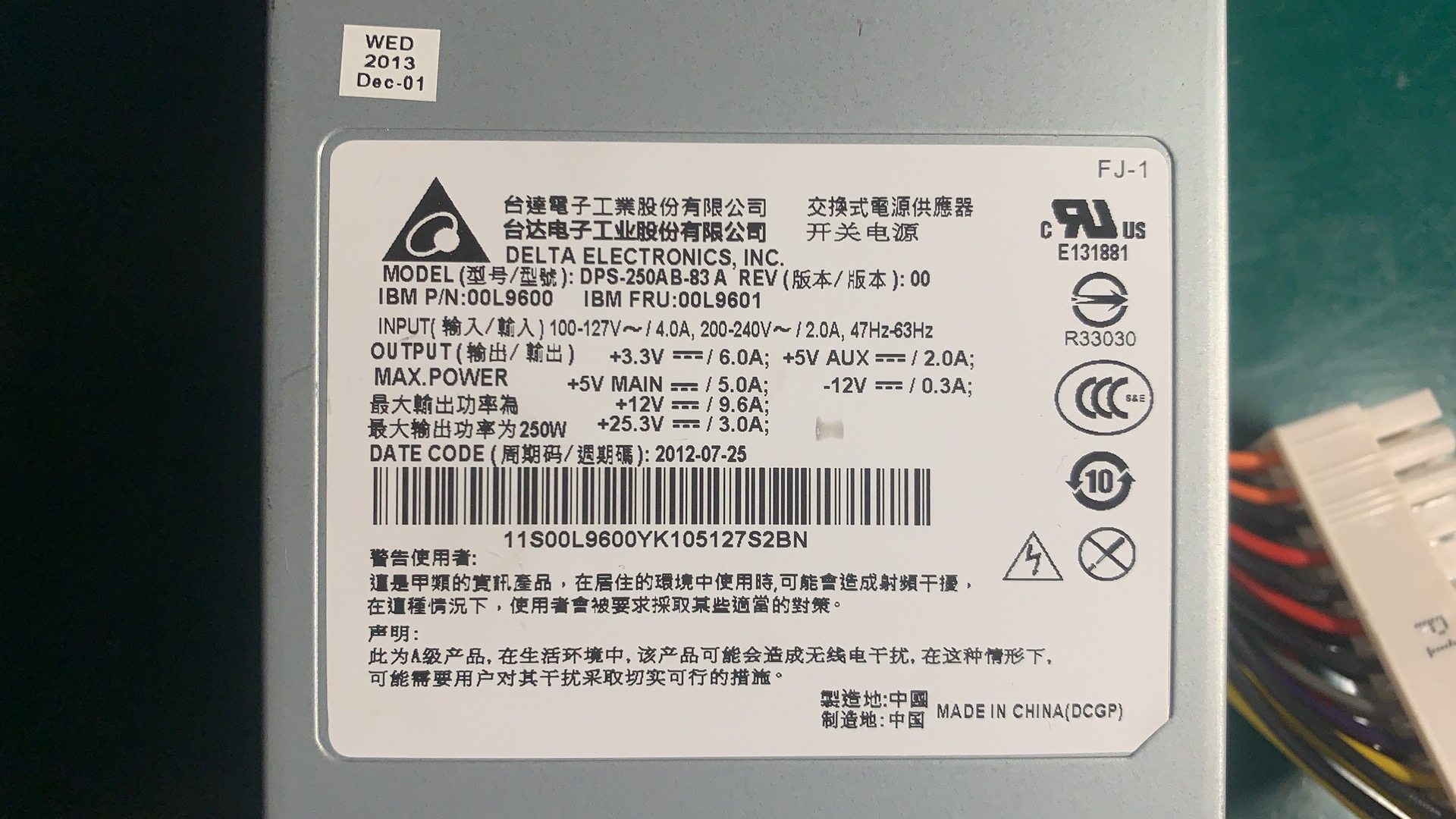
Everything you need is on the rating label of the device or the old adapter. A typical POS adapter label reads like this:
If the label is worn, the device manual lists the same voltage and current. Note the output figures (the DC the device needs), not the input (mains) figures.
Tension : la faire correspondre exactement
Voltage is the one spec with zero tolerance for “close enough.” It must match the device’s rated input because internal regulators expect that level:
| If voltage is… | Result | |
|---|---|---|
| Too low | Device won't power up, or browns out and behaves erratically | — |
| Exactly matched | Correct — what the device is designed for | — |
| Too high | Risk of immediate or gradual damage to the device | — |
Ampérage : un minimum, pas un maximum
Amperage works the opposite way to voltage: it’s a floor, not a fixed target. The device pulls only the current it needs, so equal-or-higher is safe.
| Original | Replacement | OK? | |
|---|---|---|---|
| 24V 2.5A | 24V 2.5A | Yes — exact match | — |
| 24V 2.5A | 24V 5A | Yes — higher amps is fine, often runs cooler | — |
| 24V 2.5A | 24V 2A | No — underrated, will overheat / shut down | — |
| 24V 2.5A | 19V 5A | No — wrong voltage, ignore the amps | — |
Taille du connecteur et polarité
A perfectly-specced supply is useless if the plug doesn’t fit the jack — or fits loosely. Match the physical connector too:
| Connector check | What to match | |
|---|---|---|
| Outer diameter (OD) | The barrel's outside size in mm — must match the jack | — |
| Inner diameter (ID) | The centre-pin hole size in mm | — |
| Length / shape | Long enough to seat fully; some are keyed or locking | — |
| Connector type | Barrel, keyed DIN, or a standard like Powered USB on some printers | — |
Sécurité, certification et contrefaçons
A POS power supply runs all day and often powers payment hardware, so safety isn’t optional. Run this final check before buying:
- 1
Confirm V, A, connector, polarity
Voltage exact, amperage at least the rating, connector size/type matched, polarity diagram matched. All four before anything else. - 2
Check for certification marks
Look for proper safety certification on the unit. Missing or unclear markings suggest a brick that may not meet safety standards.Caution: Suspiciously low prices versus genuine units are a common counterfeit signal. - 3
Buy OEM or a reputable replacement
Choose the genuine OEM supply or a vetted equivalent with the right specs and certification — not the cheapest anonymous adapter. - 4
Test before deploying
Power the device and confirm normal operation before putting the lane back into service. Watch for a unit that runs hot or buzzes.
Browse power adapters and internal PSUs in our power supplies category, related parts in terminal repair parts, and DC/power leads in cables & connectors. If your device shows no power at all, first work through our power-supply failure diagnosis guide to confirm the supply is the fault; for printers on the Powered USB standard, see the Powered USB guide. Send us the label figures (V, A, connector) and we’ll match the right supply.
Questions fréquentes
Comment savoir quelle alimentation mon appareil POS nécessite ?
La tension de remplacement doit-elle être exactement la même ?
Puis-je utiliser une alimentation d'ampérage supérieur ?
Comment faire correspondre le connecteur DC (fiche jack) ?
Qu'est-ce que la polarité et pourquoi importe-t-elle ?
Les adaptateurs de remplacement bon marché sans marque sont-ils sûrs ?
Sources & lectures complémentaires
- Selecting a Replacement External Power Supply — What You Need to Know — Power Electronic Tips
- How to Select a Replacement Power Adaptor or DC Power Supply — Antsig
- How Can You Know What Power Supply Will Work With Your Device? — The Solid Signal Blog
- How to Find the Right Power Adapter: Safety & Buying Tips — KYT Chargers
Guides associés
Terminaux POS tout-en-un vs modulaires : lequel acheter (et comment chacun affecte les réparations)
Le tout-en-un est net et rapide à déployer ; le modulaire est flexible et moins cher à mettre à niveau et réparer. La bonne réponse dépend de votre taille, vos plans de croissance — et comment vous voulez gérer les pannes.
Lire le guide →Guide d'achat de lecteurs code-barres : laser 1D vs imageur 2D, filaire vs sans fil, à main vs mains libres
Deux questions décident l'essentiel : devez-vous scanner des écrans de téléphone (alors 2D), et votre comptoir est-il assez chargé pour vouloir le mains libres ? Voici comment technologie, format et connexion correspondent à l'usage réel.
Lire le guide →Coupe-papier automatiques d'imprimante de tickets : guillotine vs rotatif, coupe partielle vs totale, durée de vie de la lame
Guillotine ou rotatif ? Coupe partielle ou totale ? Le coupeur est la pièce mobile la plus utilisée d'une imprimante de tickets — le bon type et le bon mode gardent la caisse rapide et les tickets nets.
Lire le guide →Catégories associées
Pièces en vedette

%20Sparta%20Riser%20Card/120c399634d85265f7a7595a979407ee_c48b4b186f0a2eea2b86d0d5a86c219e_s-l1600.jpg)

Besoin des pièces mentionnées dans ce guide ?
Pièces OEM d'origine et alternatives testées en usine pour les systèmes IBM, Toshiba, NCR, Diebold, Wincor et Hyosung — avec expédition mondiale.


