
Выбор сменного блока питания POS: напряжение, ток, разъём и полярность (сделать правильно с первого раза)
Руководство по выбору сменного блока питания POS или периферии — почему напряжение должно совпадать точно, почему ток это минимум (а не максимум), как подобрать размер разъёма и полярность, и как избежать небезопасного поддельного адаптера.
Четыре важные характеристики
Replacing a POS power supply isn’t about wattage guesswork — it’s four specs read off a label. Match the voltage exactly, supply at least the rated amperage, and match the connector and polarity perfectly. Get those four right and the replacement just works; get one wrong and the device won’t power up — or gets damaged.
| Spec | Rule | Get it wrong and… | |
|---|---|---|---|
| Voltage (V) | Match exactly | Won't start (low) or damage (high) | — |
| Amperage (A) | At least the rated value | Underrated supply overheats / shuts down | — |
| Connector | Match size, length & type | Won't seat or makes poor contact | — |
| Polarity | Match the +/- diagram | Reversed polarity can damage instantly | — |
Чтение шильдика
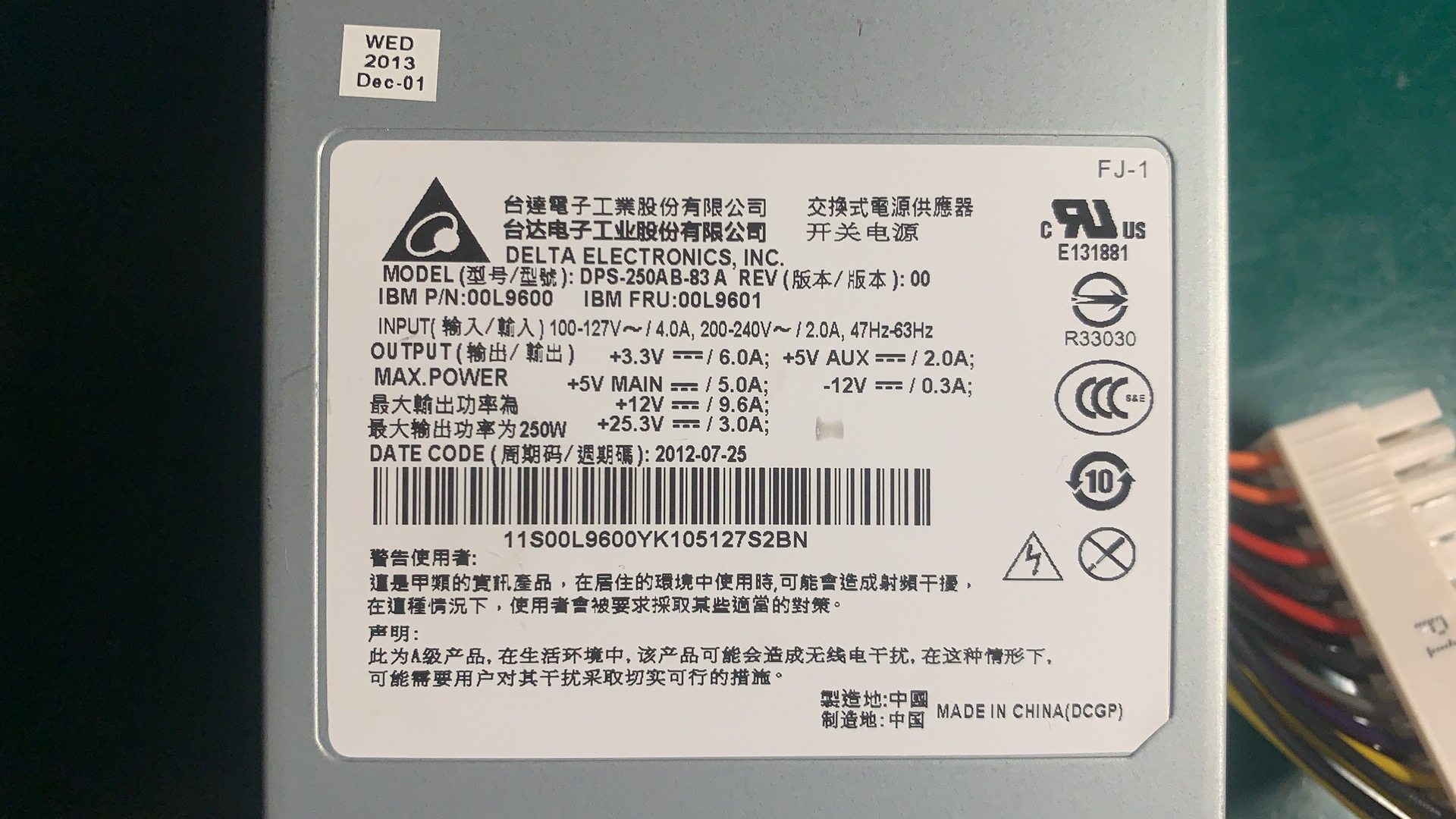
Everything you need is on the rating label of the device or the old adapter. A typical POS adapter label reads like this:
If the label is worn, the device manual lists the same voltage and current. Note the output figures (the DC the device needs), not the input (mains) figures.
Напряжение: совпадать точно
Voltage is the one spec with zero tolerance for “close enough.” It must match the device’s rated input because internal regulators expect that level:
| If voltage is… | Result | |
|---|---|---|
| Too low | Device won't power up, or browns out and behaves erratically | — |
| Exactly matched | Correct — what the device is designed for | — |
| Too high | Risk of immediate or gradual damage to the device | — |
Ток: минимум, а не максимум
Amperage works the opposite way to voltage: it’s a floor, not a fixed target. The device pulls only the current it needs, so equal-or-higher is safe.
| Original | Replacement | OK? | |
|---|---|---|---|
| 24V 2.5A | 24V 2.5A | Yes — exact match | — |
| 24V 2.5A | 24V 5A | Yes — higher amps is fine, often runs cooler | — |
| 24V 2.5A | 24V 2A | No — underrated, will overheat / shut down | — |
| 24V 2.5A | 19V 5A | No — wrong voltage, ignore the amps | — |
Размер разъёма и полярность
A perfectly-specced supply is useless if the plug doesn’t fit the jack — or fits loosely. Match the physical connector too:
| Connector check | What to match | |
|---|---|---|
| Outer diameter (OD) | The barrel's outside size in mm — must match the jack | — |
| Inner diameter (ID) | The centre-pin hole size in mm | — |
| Length / shape | Long enough to seat fully; some are keyed or locking | — |
| Connector type | Barrel, keyed DIN, or a standard like Powered USB on some printers | — |
Безопасность, сертификация и подделки
A POS power supply runs all day and often powers payment hardware, so safety isn’t optional. Run this final check before buying:
- 1
Confirm V, A, connector, polarity
Voltage exact, amperage at least the rating, connector size/type matched, polarity diagram matched. All four before anything else. - 2
Check for certification marks
Look for proper safety certification on the unit. Missing or unclear markings suggest a brick that may not meet safety standards.Caution: Suspiciously low prices versus genuine units are a common counterfeit signal. - 3
Buy OEM or a reputable replacement
Choose the genuine OEM supply or a vetted equivalent with the right specs and certification — not the cheapest anonymous adapter. - 4
Test before deploying
Power the device and confirm normal operation before putting the lane back into service. Watch for a unit that runs hot or buzzes.
Browse power adapters and internal PSUs in our power supplies category, related parts in terminal repair parts, and DC/power leads in cables & connectors. If your device shows no power at all, first work through our power-supply failure diagnosis guide to confirm the supply is the fault; for printers on the Powered USB standard, see the Powered USB guide. Send us the label figures (V, A, connector) and we’ll match the right supply.
Часто задаваемые вопросы
Как узнать, какой блок питания нужен моему POS-устройству?
Должно ли сменное напряжение быть точно таким же?
Можно ли использовать блок с большим током?
Как подобрать разъём DC (штекер)?
Что такое полярность и почему она важна?
Безопасны ли дешёвые безымянные сменные адаптеры?
Источники и дополнительные материалы
- Selecting a Replacement External Power Supply — What You Need to Know — Power Electronic Tips
- How to Select a Replacement Power Adaptor or DC Power Supply — Antsig
- How Can You Know What Power Supply Will Work With Your Device? — The Solid Signal Blog
- How to Find the Right Power Adapter: Safety & Buying Tips — KYT Chargers
Связанные руководства
Моноблочные против модульных POS-терминалов: что покупать (и как каждый влияет на ремонт)
Моноблок аккуратен и быстр в развёртывании; модульный гибок и дешевле в апгрейде и ремонте. Верный ответ зависит от размера, планов роста — и как вы хотите обрабатывать отказы.
Читать →Руководство по выбору сканера штрихкодов: 1D-лазер против 2D-имиджера, проводной против беспроводного, ручной против бесконтактного
Большинство решают два вопроса: нужно ли сканировать экраны телефонов (тогда 2D) и достаточно ли загружена касса, чтобы хотеть бесконтактный режим? Вот как технология, форм-фактор и подключение ложатся на реальную работу.
Читать →Автоотрезчики чековых принтеров: гильотинный против ротационного, частичный против полного реза, и ресурс лезвия
Гильотинный или ротационный? Частичный или полный рез? Отрезчик — самая нагруженная движущаяся часть чекового принтера: правильный тип и режим держат кассу быстрой, а чеки опрятными.
Читать →Связанные категории
Рекомендуемые запчасти

%20Sparta%20Riser%20Card/120c399634d85265f7a7595a979407ee_c48b4b186f0a2eea2b86d0d5a86c219e_s-l1600.jpg)

Нужны детали, упомянутые в этом руководстве?
Оригинальные OEM-детали и заводские аналоги для систем IBM, Toshiba, NCR, Diebold, Wincor и Hyosung — с доставкой по всему миру.


