
POS-клавиатура не работает? Чистка, спасение после пролива, переназначение клавиш и замена
Полевое руководство по POS-клавиатуре с мёртвыми или залипающими клавишами — чистка под колпачками, восстановление после пролива жидкости, переподключение и проверка драйверов, перепрограммирование перемаркируемых POS-клавиш и выбор правильной замены.
Быстрая сортировка
Dead or sticky keys on a POS keyboard look like a hardware failure, but the cause is almost always mundane: crumbs and grime under the keys, a past liquid spill, or a loose cable. The first clue is how many keys are affected — a few dead keys point to debris under those keys, while a fully dead keyboard points to the connection. Triage accordingly:
| Symptom | Start here | |
|---|---|---|
| A few keys dead or sticky | Clean under those keycaps (debris / spill residue) | — |
| Whole keyboard unresponsive | Reseat the USB/PS-2 cable; try another port | — |
| Keys type wrong characters | Layout/driver, or reprogram a programmable keyboard | — |
| Recent liquid spill | Power off now, drain, dry fully before testing | — |
| Still failing after cleaning | Cross-test, then replace the keyboard | — |
Стандартные и программируемые POS-клавиатуры
POS keyboards come in two broad families, and which you have changes both the fix and the replacement:
| Standard QWERTY | Programmable POS keyboard | |
|---|---|---|
| Keys | Fixed layout | Remappable, often relegendable keycaps |
| Built-in MSR | Rarely | Often (card swipe in the keyboard) |
| Config software | None needed | Vendor utility for key maps / MSR tracks |
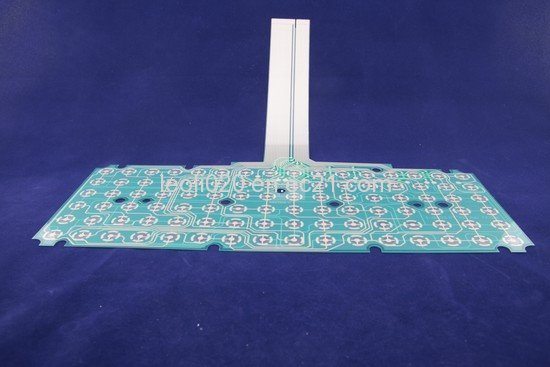
| Construction | Membrane or mechanical | Usually rugged membrane |
| 'Wrong character' fix | Check OS layout/driver | Reprogram the key map |
| Typical use | Back office, general entry | Front-of-house, hospitality, ticketing |
Чтение симптома
Read the symptom to point straight at the cause:
| Symptom | Most likely cause | |
|---|---|---|
| One/a few keys dead | Debris or dried spill under those keys | — |
| Key sticks or repeats | Sticky residue around the keycap stem | — |
| Whole keyboard dead | Cable/connector unseated, dead port, or driver | — |
| Wrong characters typed | OS layout mismatch, or programmable key map | — |
| Intermittent after a spill | Liquid bridging contacts / early corrosion | — |
| Legends worn off keys | Cosmetic — relegend or replace keycaps | — |
Пошагово: очистить, переподключить, проверить
Work the sequence in order and stop when the keys respond. Each step rules out a class of cause before you spend on a replacement.
- 1
Reseat the cable and try another port
Unplug and firmly re-insert the USB or PS/2 connector, then try a different port. A whole-keyboard outage is most often a connection, not the keys. - 2
Blow out debris
With the keyboard off, blast between the keys with short bursts of compressed air. This clears crumbs and dust — the most common cause of a few non-working keys. - 3
De-cap and clean stubborn keys
Gently pry off the affected keycap (note its position), and clean the contact area with a cotton swab lightly dampened with 90% isopropyl alcohol. Let it dry fully.Caution: Use isopropyl alcohol, never water — water leaves residue and can corrode the membrane contacts. - 4
Test in a text editor or key tester
Open a text field (or an online key tester) and press each key. This confirms exactly which keys register and whether the fault is hardware or a layout/driver mismatch. - 5
Check driver/layout, then cross-test and replace
Verify the OS keyboard layout and Device Manager entry. Still failing? Cross-test on another terminal; if the same keys die there, the keyboard’s circuit is damaged — replace it.
Проливы жидкости и перепрограммирование перемаркируемых клавиш
Two POS-specific scenarios deserve their own playbook: a liquid spill, and a programmable keyboard whose keys are mislabeled or mismapped.
After a spill: power off and unplug immediately, turn the keyboard upside down to drain, and resist the urge to keep trading on it. For anything beyond plain water — coffee, soft drinks, anything sugary — clean the affected area with isopropyl alcohol and let it dry completely (a full day is safer than an hour). Membrane POS keyboards are especially vulnerable, so a serious spill often ends in replacement.
| Spill type | Action | |
|---|---|---|
| Plain water, caught early | Drain, dry fully, then test — often recovers | — |
| Sugary / sticky drink | Clean with IPA, dry a full day; expect possible replacement | — |
| Large volume into the unit | Likely membrane damage — plan to replace | — |
| Wrong legends only | Swap relegendable keycap inserts | — |
| Wrong functions / characters | Reprogram the key map with the vendor utility | — |
Выбор сменной клавиатуры
When the circuit is damaged or the keys won’t recover, match the replacement on these specs for a clean swap:
| Spec | How to choose | |
|---|---|---|
| Type | Standard QWERTY, or programmable with remappable keys | — |
| Interface | USB (most current) or PS/2 for legacy terminals | — |
| Integrated MSR | Choose a keyboard with a built-in card swipe if you need one | — |
| Layout & language | Match the regional layout your staff use | — |
| Build | Spill-resistant / sealed for food-service and high-traffic lanes | — |
Browse standard and programmable POS keyboards in our POS keyboards category, and replacement cables in cables & connectors. If your keyboard has an integrated card swipe that’s the actual fault, see our MSR card reader troubleshooting guide. Tell us your terminal and whether you need a programmable layout or built-in MSR, and we’ll match the right keyboard before you order.
Часто задаваемые вопросы
Несколько клавиш POS-клавиатуры перестали работать — вероятная причина?
Как безопасно почистить под клавишами POS-клавиатуры?
Я пролил жидкость на клавиатуру — что делать прямо сейчас?
Клавиши моей программируемой POS-клавиатуры печатают не то — как исправить?
Виновата клавиатура или компьютер?
Когда просто заменить клавиатуру?
Источники и дополнительные материалы
- Some Keys on My Computer Keyboard Aren't Working — Computer Hope
- Keyboard Troubleshooting Guide: Quick Solutions for Common Problems — Corsair
- Why Are Some Keyboard Keys Not Working: Troubleshooting Guide — Keyboard Gurus
- Keyboard Stopped Working After Cleaning (spill/clean recovery) — iFixit
- Keyboard Troubleshooting Guide — Keyboard Tester Pro
Связанные руководства
Подключение денежного ящика: drawer-kick RJ11/RJ12, от принтера против USB, и импульс 12–24В
Денежный ящик POS не подключается к кассе — его открывает импульс 12–24В от чекового принтера по кабелю RJ11/RJ12. Верные интерфейс, пины и напряжение — и он работает.
Читать →Шумный или отказывающий вентилятор POS? Диагностируйте подшипник, очистите и подберите замену
Скрежещущий или воющий вентилятор POS — обычно пыль или изношенный подшипник, а без внимания это ведёт к перегреву и отключениям. Вот как найти шумный вентилятор, решить чистить-или-менять и подобрать нужный.
Читать →Чек печатает бледно, тёмно, частично или полосами? Диагностика качества термопечати (начните с самотеста)
Бледные, полосатые или односторонние чеки почти всегда — грязная головка, не та бумага или настройка плотности, а не мёртвый принтер. Один самотест говорит, в чём решение — в ПО или в железе.
Читать →Связанные категории
Рекомендуемые запчасти
%20Sparta%20Riser%20Card/120c399634d85265f7a7595a979407ee_c48b4b186f0a2eea2b86d0d5a86c219e_s-l1600.jpg)

Нужны детали, упомянутые в этом руководстве?
Оригинальные OEM-детали и заводские аналоги для систем IBM, Toshiba, NCR, Diebold, Wincor и Hyosung — с доставкой по всему миру.


