
Impresoras POS Fujitsu (FP-1000 / FP-510): identifica tu modelo, lee el esquema KA02066, pide la pieza correcta
Una guía de abastecimiento para impresoras de recibos POS Fujitsu — la FP-1000 y la FP-510, leer el esquema de configuración KA02066-Dxxx, el ancho de papel dual 58/80 mm, y acertar el cabezal, el cortador y la variante de configuración correcta.
La respuesta rápida
Fujitsu’s FP-1000 is a durable, full-featured thermal receipt printer — and sourcing parts for it is straightforward once you read the right code. Everything keys to the model name plus the KA02066-Dxxx configuration number on the label:
| Step | What to capture | |
|---|---|---|
| 1. Read the model | FP-1000 (full-feature) or FP-510 (value) | — |
| 2. Read the KA02066-D number | e.g. KA02066-D115 / -D210 — the exact config | — |
| 3. Note paper width | FP-1000 runs selectable 58 mm or 80 mm | — |
| 4. Cross-reference & order | Match the config + printhead number to a tested part | — |
La gama de impresoras POS Fujitsu
Fujitsu’s POS receipt range centres on two thermal models, with older CT-series mechanisms still in the field:
| Model | Tier | Notes | |
|---|---|---|---|
| FP-1000 | Full-feature | 203 dpi, ~180 mm/s, dual 58/80 mm, integrated cutter | — |
| FP-510 | Value | Lower-cost receipt printer in the same family | — |
| CT-series (legacy) | Older | Earlier Fujitsu mechanisms; printheads still sourced (e.g. KD-prefixed) | — |
Qué hace de la FP-1000 un caballo de batalla
The FP-1000 earns its “workhorse” reputation on a few specifics that also tell you what parts it uses:
| Spec | FP-1000 | |
|---|---|---|
| Resolution | 203 dpi | — |
| Speed | ~180 mm/s | — |
| Mechanism life | Rated for tens of millions of lines | — |
| Paper width | Selectable 58 mm and 80 mm; rolls up to ~83 mm dia. | — |
| Built-in | Cutter, buzzer, cash-drawer kick, drop-in paper load | — |
Leer el esquema de configuración KA02066
The KA02066 number on the label is the key to ordering. Read it in full:
The label is on the base or rear of the printer. Capture the complete KA02066-D number plus the model name — together they let a supplier match the exact configuration, including the fitted interface.
Piezas de desgaste y el cabezal
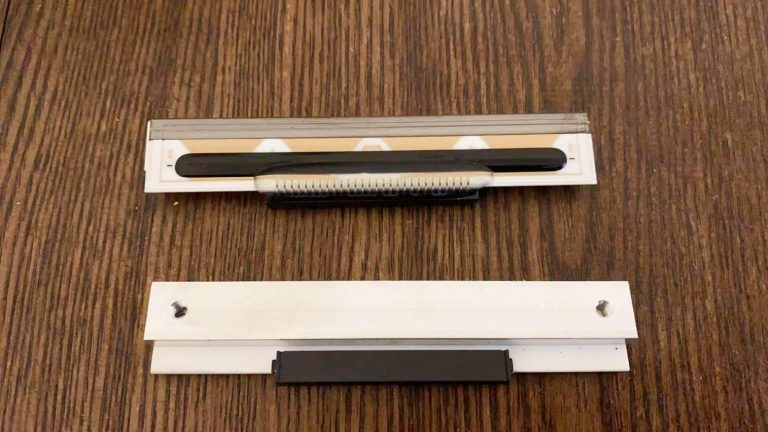
These are the parts that wear on an FP-1000. Replacing the right one beats replacing the printer:
| Part | Symptom / note | |
|---|---|---|
| Thermal printhead | Faint or missing dots; match the Fujitsu head part no. (KD/KA) | — |
| Cutter | Jams or won't cut cleanly (integrated on FP-1000) | — |
| Platen roller | Feed problems, smudging — confirm 58 vs 80 mm | — |
| Power supply / adapter | Dead printer — many units ship without the AC adapter | — |
| Interface | Connects but won't print — confirm the config's interface | — |
Referencia cruzada y pedido
Put it together into a clean order:
- 1
Capture the identifiers
Note the model (FP-1000 / FP-510) and the full KA02066-D configuration number from the label, plus your paper width (58 or 80 mm). - 2
Find the printhead number
For a head, read the Fujitsu printhead part number (KD/KA-prefixed) printed on the head if you can, rather than assuming from the model. - 3
Cross-reference the OEM number
Match the Fujitsu OEM number to a genuine or quality-tested equivalent at the same 203 dpi and the correct configuration. - 4
Verify before shipping
Send a photo of the printer label (model + KA02066-D number) so your supplier can confirm the part — including interface and power — before it ships.
Browse Fujitsu printers and spares in our Fujitsu printer & parts category, printheads in thermal print heads, and other receipt printers in POS printers. For head-replacement technique and power diagnosis, see our printhead replacement and power supply failure guides. Send us your model and KA02066-D number and we’ll match the exact Fujitsu part.
Preguntas frecuentes
¿Qué diferencia hay entre la Fujitsu FP-1000 y la FP-510?
¿Cómo identifico exactamente qué impresora/configuración Fujitsu tengo?
¿Qué significa un número Fujitsu como KA02066-D210?
¿De verdad la FP-1000 imprime en 58 mm y 80 mm?
¿Qué pieza se desgasta en una Fujitsu FP-1000, y puedo reemplazar solo eso?
¿Cómo me aseguro de que una pieza Fujitsu de repuesto encaje?
Fuentes y lecturas complementarias
- Fujitsu FP-1000 Thermal Printer (KA02066-D210 example) — IT Instock
- Fujitsu FP-1000 POS Printer — KA02066-D115 — Barcode Discount
- Fujitsu FP-1000 Datasheet — Manualzz
- Fujitsu POS Printer: FP-1000 Series (overview) — SlideShare
- Fujitsu POS Printers (reference listings, KA02066 numbers) — eBay
Guías relacionadas
Reemplazo del teclado PIN (EPP) del cajero: sabotaje, cumplimiento PCI PTS, inyección de claves y elegir la pieza correcta
El teclado PIN del cajero es la pieza más regida por la seguridad de la máquina. Reemplazarlo no es solo un cambio — son reglas de sabotaje, cumplimiento PCI PTS y claves que solo una parte autorizada puede inyectar. Aquí está lo que eso significa en la práctica.
Leer guía →Impresoras de recibos NCR RealPOS: identifica tu modelo y pide el cabezal, cortador y piezas correctos
Pedir piezas NCR RealPOS falla en un punto: el cabezal viene en versiones de 9 pines y 15 pines que se parecen y no son intercambiables. Aquí está cómo leer tu número de modelo y acertar la pieza exacta.
Leer guía →Piezas POS Wincor Nixdorf / Diebold Nixdorf: identifica tu BEETLE e impresora serie TH y pide la pieza correcta
Los sistemas BEETLE de Wincor Nixdorf (ahora Diebold Nixdorf) están por todas partes en el retail europeo. La clave para pedir piezas es el esquema de números 1750 — aquí está cómo leerlo y acertar la pieza correcta de la serie TH.
Leer guía →Categorías relacionadas
Repuestos destacados



¿Necesita las piezas mencionadas en esta guía?
Piezas OEM originales y alternativas probadas en fábrica para sistemas IBM, Toshiba, NCR, Diebold, Wincor y Hyosung — con envío mundial.


